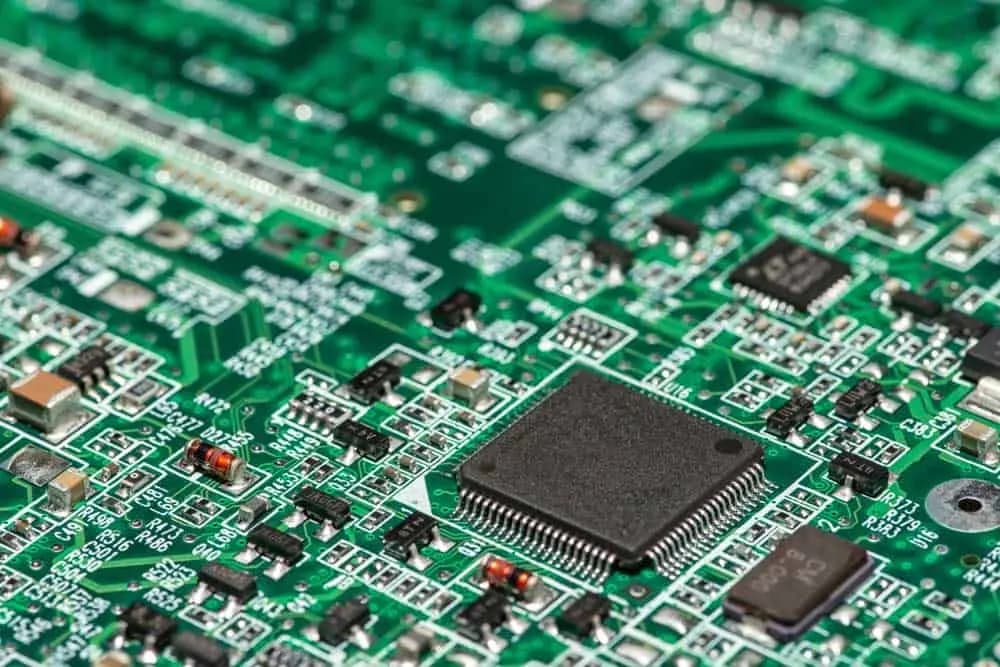
You may have seen a circuit board in your electronic appliance and device and wondered what it is. Circuit boards house the most crucial parts of our electronics, including circuitry.
For more information on industry standards, see printed circuit board and IPC standards.
"If your design needs controlled impedance, length matching, and production release data, the real threshold is not price but output quality; a tool that cannot generate verified Gerber, drill, and pick-and-place files will cost more than a $300 monthly license."
Hommer Zhao, Founder & CEO, WIRINGO
Every electronic device you own—from your smartphone to your refrigerator—relies on circuit boards to function. But what exactly are circuit boards, how do they work, and why should you care? This guide covers everything from basic concepts to design principles and troubleshooting.
What is a Circuit Board?
A circuit board (technically called a printed circuit board or PCB) is a flat board made of insulating material with conductive copper pathways etched onto it. These pathways connect electronic components—resistors, capacitors, integrated circuits, and more—creating complete circuits that perform specific functions.
Think of it as a city's road system: the copper traces are roads, the components are buildings, and electrical signals are the traffic flowing between them. The board provides both the physical structure to mount components and the electrical connections to make them work together.
The Anatomy of a Circuit Board
The Substrate
Most circuit boards use FR-4—a fiberglass-reinforced epoxy that's rigid, flame-resistant, and electrically insulating. The "FR" stands for flame retardant, and "4" indicates the grade. For specialized applications:
- Polyimide: For flexible circuits that need to bend
- Aluminum: For high-power LEDs and power electronics (better heat dissipation)
- Rogers/PTFE: For RF and high-frequency circuits
- Ceramic: For extreme temperatures and specialized applications
Copper Layers
Conductive copper is laminated onto the substrate and then selectively removed (etched) to create the circuit pattern. Copper thickness is specified in ounces per square foot:
- 0.5 oz (17µm): Fine traces, space-constrained designs
- 1 oz (35µm): Standard for most electronics
- 2 oz (70µm): Higher current capacity
- Heavy copper (3+ oz): Power electronics, automotive
Solder Mask
The green (or other colored) coating over most of the board is solder mask. It:
- Protects copper from oxidation and contamination
- Prevents solder bridges during assembly
- Insulates traces from accidental shorts
- Provides visual contrast for inspection
Silkscreen
The white printing showing component designators, values, and logos is the silkscreen layer. It helps during assembly and troubleshooting—you can quickly identify which component is R42 or where pin 1 is.
Surface Finish
Exposed copper pads need protection until soldering. Common finishes include:
- HASL (Hot Air Solder Leveling): Traditional, inexpensive, good solderability
- ENIG (Electroless Nickel Immersion Gold): Flat surface, good for fine-pitch components
- OSP (Organic Solderability Preservative): Economical, shorter shelf life
- Immersion Silver/Tin: Specific applications and requirements
Types of Circuit Boards
By Layer Count
Single-sided PCBs: Copper on one side only. Simplest and cheapest. Good for basic circuits like LED lights, calculators, and simple power supplies.
Double-sided PCBs: Copper on both sides, connected through plated holes (vias). The workhorse of electronics—suitable for most consumer and industrial applications.
Multi-layer PCBs: Four, six, eight, or more copper layers separated by insulating material. Necessary for complex designs like computer motherboards, smartphones, and high-density electronics. More layers = more routing options and better signal integrity, but higher cost.
By Flexibility
Rigid PCBs: Standard fiberglass boards that maintain their shape. Most common type.
Flexible PCBs: Made from thin, flexible polyimide. Can bend, fold, or twist. Used in cameras, wearables, and space-constrained applications.
Rigid-Flex PCBs: Combine rigid sections with flexible interconnects. Replace cables and connectors with integrated flexible sections. Common in aerospace, medical devices, and complex consumer electronics.
By Application
High-Frequency PCBs: Specialized materials for RF/microwave circuits (GHz frequencies). Used in radar, 5G, and satellite communications.
HDI (High-Density Interconnect): Microvias, fine traces, and higher component density. Essential for smartphones and compact devices.
Metal Core PCBs: Aluminum or copper substrate for thermal management. Used in LED lighting and power electronics.
How Circuit Boards Are Made
The manufacturing process involves multiple precision steps:
1. Design
Engineers create the circuit using schematic capture software, then translate it to physical layout using PCB design software. The output is a set of Gerber files specifying each layer.
"For teams designing 6-layer and 8-layer boards, library control and DRC rule coverage matter more than UI polish, because one missed clearance rule can burn a full prototype spin."
Hommer Zhao, Founder & CEO, WIRINGO
2. Imaging
The circuit pattern is transferred to copper-clad laminate using photolithography. A light-sensitive photoresist is applied, exposed through a mask (or directly imaged by laser), and developed.
3. Etching
Chemical etching removes unwanted copper, leaving only the desired circuit pattern.
4. Lamination (Multi-Layer)
For multi-layer boards, inner layers are stacked with prepreg (pre-impregnated fiberglass) and pressed together under heat and pressure.
5. Drilling
CNC machines drill thousands of holes—some smaller than a human hair. These become vias and component mounting holes.
6. Plating
Electroplating deposits copper inside drill holes, creating electrical connections between layers.
7. Finishing
Solder mask is applied, silkscreen is printed, and surface finish is applied to exposed copper.
8. Testing
Every board is electrically tested to verify connections and isolation.
Circuit Board Design Principles
Schematic First
Always start with a correct, complete schematic. The schematic defines functionality; the PCB layout is just the physical implementation.
Power Distribution
Power and ground are critical:
- Use planes rather than traces when possible
- Add decoupling capacitors near every IC
- Consider current paths and avoid long power runs
- Size traces and planes for expected current
Signal Integrity
As frequencies increase, signal integrity matters:
- Control trace impedance for high-speed signals
- Minimize trace lengths for critical signals
- Use ground planes to provide return paths
- Consider crosstalk between adjacent traces
Thermal Management
Components generate heat that must be dissipated:
- Provide thermal relief for power components
- Use thermal vias to conduct heat to inner layers or opposite side
- Leave space for heatsinks where needed
- Consider copper weight and plane areas
Design for Manufacturing (DFM)
Make your design manufacturable:
- Follow your manufacturer's design rules
- Use standard via and hole sizes
- Ensure adequate spacing and clearances
- Consider panel layout and tooling
Common Circuit Board Problems
Manufacturing Defects
- Shorts and opens: Traces that shouldn't connect do, or vice versa
- Poor solder joints: Cold joints, insufficient solder, bridges
- Missing components: Pick-and-place errors
- Wrong components: Value or polarity mistakes
Failure Modes
- Thermal stress: Repeated heating/cooling cycles crack joints
- Electromigration: High current density moves metal atoms over time
- Corrosion: Moisture and contaminants attack copper
- Mechanical stress: Flexing, vibration, or impact damages connections
- ESD damage: Static discharge destroys sensitive components
Troubleshooting Tips
- Visual inspection first: Many problems are visible under magnification
- Check power: Verify correct voltages at power pins
- Test connections: Use continuity testing for suspected opens
- Follow the signal: Trace from input to output, stage by stage
- Compare to known good: If possible, compare measurements to a working unit
Conclusion
Circuit boards are the foundation of modern electronics. Understanding how they work—from basic construction to design principles—empowers you to design better products, troubleshoot problems effectively, and appreciate the engineering in every device you use.
Whether you're a hobbyist building your first Arduino project or a professional designing complex systems, circuit board knowledge is essential. The principles remain constant even as technology advances: good design, proper materials, careful manufacturing, and attention to detail.
"I look for three outputs before I trust any PCB CAD flow: netlist consistency, manufacturing outputs checked against IPC naming conventions, and a 3D review that catches connector interference before release."
Hommer Zhao, Founder & CEO, WIRINGO
If you want to turn this topic into a production decision, review our EDA comparison reference, check the supporting numbers on the EDA shortcuts reference, and use the contact page if you need a second review before release.
FAQ
What features matter most in PCB layout software?
For professional work, the short list is controlled-rule DRC, multi-layer stackup support, 3D clearance review, and manufacturing outputs such as Gerber X2, drill files, and pick-and-place exports.
Is free PCB design software good enough for a real product?
It can be for 2-layer or moderate 4-layer designs, but once the board reaches fine-pitch BGAs, impedance control, or dense library management, commercial tools usually save at least one prototype spin.
How many layers can entry-level tools handle reliably?
Many can draw 4-layer and even 6-layer boards, but the real limit is rule management and verification quality, not the raw layer count shown in marketing.
What file outputs should I verify before sending a board to fabrication?
At minimum, review Gerber or ODB++, NC drill, stackup notes, assembly drawings, and BOM outputs. A missing polarity mark or drill map can delay production by days.
Why is library control such a big deal in EDA tools?
A footprint error of even 0.2 mm can be enough to cause tombstoning, insufficient heel fillet, or connector interference. Centralized libraries reduce that risk across every release.
How should a team compare EDA tools objectively?
Use the same test design, then score routing speed, DRC coverage, library workflow, and manufacturing output accuracy. Three trial builds usually reveal more than a feature checklist.


Need Help with Your PCB Design?
Check out our free calculators and tools for electronics engineers.
Browse PCB Tools"In over 20 years of manufacturing experience, we have learned that quality control at the component level determines 80% of field reliability. Every specification decision you make today affects warranty costs three years from now."
— Hommer Zhao, Founder & CEO, WIRINGO